> ## Documentation Index
> Fetch the complete documentation index at: https://docs.metz.sh/llms.txt
> Use this file to discover all available pages before exploring further.
# Data & Views
If you have a data member in your class, you can decorate it with `@Show` and it will be visible in the playground!
For example, check out the code for [Average Stock Price](https://app.metz.sh/try?templateId=7), and you will see that
we have decorated `averagePrice` with `@Show`. That's why it shows up here:
You can decorate as many data members you want, event private ones!
## Customizing how the data is presented
Say if you have a class which you are using to model a database. It has a member called `data`, which you'd want to decorate with `@Show`.
```typescript theme={null}
type Order = {
id: string;
thing: string;
status: string;
createdAt: number;
};
class OrdersTable {
@Show
private data: Order[] = [];
}
```
This simply displays that array in playground. Wouldn't it be nice if `data` could actually be rendered as a table?
### Table View
Well, yes! That's why we have `@Table`, which you can decorate your class with. Simply provide the "columns" you want to show and you get a nice looking view!
For example:
```typescript theme={null}
@Table(['id', 'thing', 'status', 'createdAt'])
class OrdersTable {
@Show
private data: Order[] = [];
}
```
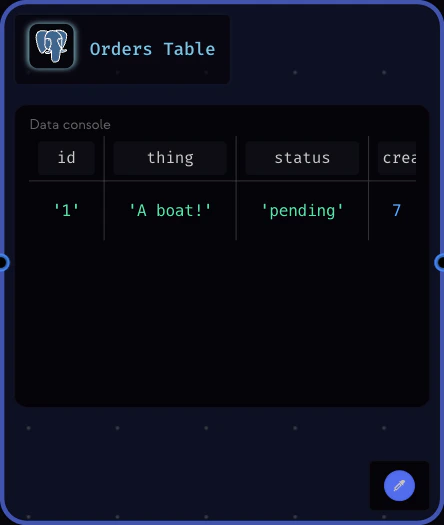 This view takes the liberty of setting the icon as Postgres. You can change that to anything.
With table view, only one member should be decorated with `@Show` and it should be an array of records.
### Collection View
Similarly, we have `@Collection` to show objects.
For example:
```typescript theme={null}
@Collection
class OrdersTable {
@Show
private data: Order[] = [];
}
```
This view takes the liberty of setting the icon as Postgres. You can change that to anything.
With table view, only one member should be decorated with `@Show` and it should be an array of records.
### Collection View
Similarly, we have `@Collection` to show objects.
For example:
```typescript theme={null}
@Collection
class OrdersTable {
@Show
private data: Order[] = [];
}
```
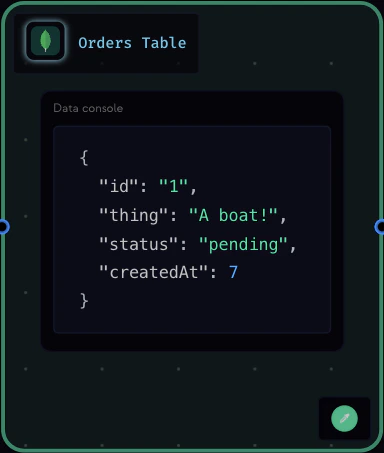 With collection view, only one member should be decorated with `@Show` and it should be an array of records.
### KeyValue View
And lastly, you can use `@KeyValue` to render a `Map`.
For example:
```typescript theme={null}
@KeyValue
class Redis {
@Show
data: Map = new Map();
}
```
With collection view, only one member should be decorated with `@Show` and it should be an array of records.
### KeyValue View
And lastly, you can use `@KeyValue` to render a `Map`.
For example:
```typescript theme={null}
@KeyValue
class Redis {
@Show
data: Map = new Map();
}
```
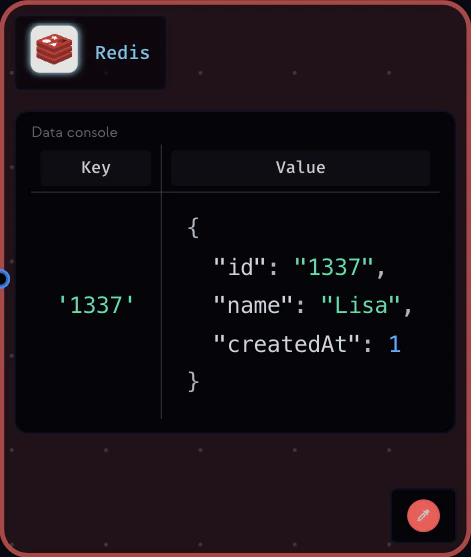 With keyvalue view, only one member should be decorated with `@Show` and it should be a `Map`.
### Where did all the methods go?
When you assign a view to a class, the runtime collapses its corresponding node.
All the methods are hidden, and all the edges going to those methods
now go to the parent class node. Giving the view a clean look.
Mind you, simply decorating a member with `@Show` won't cause this. You have to assign a view to the class.
With keyvalue view, only one member should be decorated with `@Show` and it should be a `Map`.
### Where did all the methods go?
When you assign a view to a class, the runtime collapses its corresponding node.
All the methods are hidden, and all the edges going to those methods
now go to the parent class node. Giving the view a clean look.
Mind you, simply decorating a member with `@Show` won't cause this. You have to assign a view to the class.